






Greenlight

Enjoy Greenlight’s money app and debit card for free*
Teach your kids to earn, save, and spend wisely with a Greenlight debit card.
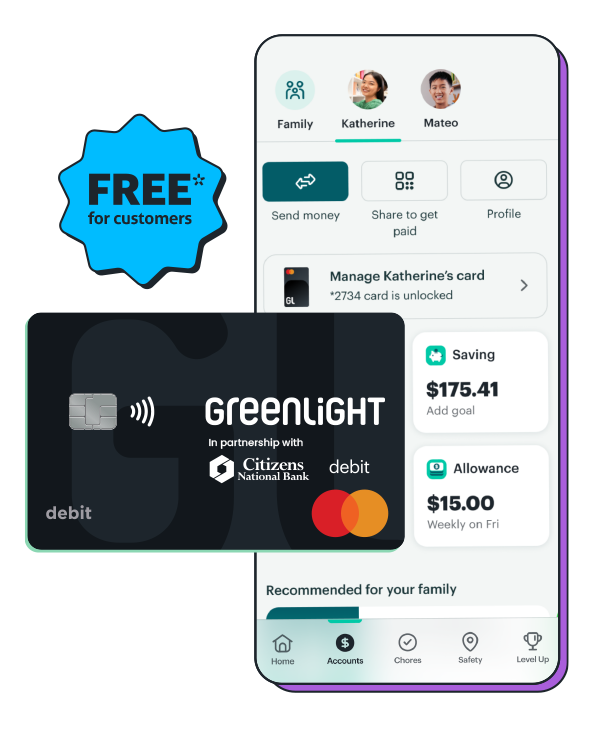
A debit card for kids.
And so much more.
What CNB checking account customers get with Greenlight.
- Money management: Send money quickly, set flexible controls, and get real-time notifications.
- Chores and allowance: Assign chores and automate allowance — with the option to connect payouts to chore progress.
- Savings goals: Set savings goals for what your kids really want — and watch them grow together.
- Financial literacy game: Kids play Greenlight Level Up™, the game that makes money concepts easy to understand and fun to learn.
FAQs
What is included in my free* Greenlight subscription?
Your subscription includes debit cards for up to 5 kids, spending notifications, chores, automated allowance, the financial literacy game Level Up™, and more.
How much does Greenlight cost?
As a Citizens National Bank checking account customer, your Greenlight subscription is free*.
How do I access my free* Greenlight subscription?
If you’re a Citizens National Bank checking account customer, you can enroll in your free* Greenlight subscription directly through the CNB Mobile Banking app. Existing Greenlight customers can also switch their current account to a free* subscription within the CNB Mobile Banking app.
How do I contact Greenlight support?
By Phone
- Call 888-483-2645
- Follow the security instructions to verify your account.
- When prompted, indicate that you are calling about Citizens National Bank’s partnership with Greenlight. From there confirm the information & you will be connected with a Greenlight agent.
By Chat (via the Greenlight app)
- Click on the ‘gear symbol’ and navigate to the ‘Help center’.
- Click the “chat” icon in the bottom right corner.
- Type Citizens National Bank and follow the steps to receive a phone call or text message to get connected to an agent.
Text Greenlight Support: 404-974-3024
Call Greenlight Support: 888-483-2645
Email Greenlight Support: support@greenlight.com
What is the complimentary Greenlight account benefit?
CNB checking customers have complimentary access to the Greenlight Select plan. This plan is not advertised on Greenlight’s website. Clients can have debit cards and Greenlight app access for up to five kids, including Greenlight’s Level Up™ interactive financial literacy content. Users can also set up chores, allowance, flexible spending controls, and alerts within the Greenlight app. The select plan does include 2% rewards on savings. This plan does not include Greenlight’s investing.
What additional information is required to open a Greenlight account?
Parents can register their family for Greenlight directly from the CNB Mobile Banking app. After acknowledging the program and providing consent, the parent will provide the child’s legal first and last name and date of birth. The child’s mobile number is optional if they want to invite their child to the Greenlight app.
How does a member enroll in Greenlight through the integration?
In the CNB Mobile Banking app, parents will:
- Tap the Greenlight tile
- Review Greenlight Overview
- Consent to sharing personal and account information with Greenlight for registration purposes
- Complete the Greenlight registration process and download the Greenlight app
Can the Greenlight debit card be added to the mobile wallet for my child on their phone?
Yes, a Greenlight debit card can be added to the mobile wallet on your child’s phone by manually adding the card.
Can existing Greenlight customers be added to the program?
Yes! From the CNB Mobile Banking app, click the Greenlight tile. On the next screen, there will be a link that states ‘Already a Greenlight Customer’. Once selected, it will launch an experience in the Greenlight app that prompts the customer to update their account to enroll and qualify for Citizens National Bank’s Greenlight program.
Is there a minimum age to have a Greenlight card?
We support kids and grown-ups of all ages. No minimum (or maximum) age here. The Primary (Parent) must be at least 18 years old and a U.S. resident.
Can I send money to my child’s Greenlight card from the CNB Mobile Banking app?
Yes, parents can now send money to the child’s Greenlight card or to the child’s spending and saving buckets. In the CNB Mobile Banking app, tap the child’s name with their balance information. This will launch a new screen showing more information about that child. Hit the ‘Send Money’ button near the top and select the amount, origin and destination of the funds. Add an optional note or picture and tap ‘Transfer’.
Is this a debit or credit card?
Greenlight is a debit card for kids, not a credit card. Parents load money onto the card from their own funding source connected through the CNB Mobile Banking app and Greenlight app. And because it’s a debit card, kids can’t spend what isn’t there. That’s a pretty valuable life lesson.
Is there an app for kids?
Kids and parents will both use the same Greenlight app you see in the app store, but have two different experiences and individual login credentials. Parents can set up their child’s login under the child’s profile settings.
Parents will also be able to view certain Greenlight features directly in the CNB Mobile Banking app.
Is Greenlight safe?
Greenlight debit cards are FDIC-insured up to $250,000 and come with Mastercard’s Zero Liability Protection. Greenlight blocks ‘unsafe’ spending categories, sends real-time transaction notifications, lets parents turn cards off at any time, and gives parents flexible ATM and spending controls.
Can Greenlight card be used Internationally?
Yes, the Greenlight card can be used internationally in most countries, and there are no international fees or any foreign transaction fees! For a complete list of countries where the card cannot be used, click here.
How do I activate my child’s Greenlight card?
When your child’s card arrives, follow these simple steps to activate it right away:
- Open your Greenlight App. From your Parent Dashboard, you should see a notification prompting you to activate
your child’s card. - Tap on the notification and input the card’s expiration date and security code in the app to activate it.
- Next, visit your child’s dashboard by clicking their square at the top of your Parent Dashboard.
- Select “Manage Card” then “Set debit card PIN.” After the PIN is set, your physical card is activated and ready to use!
The Greenlight® prepaid card is issued by Community Federal Savings Bank, member FDIC, pursuant to license by Mastercard International.
*Citizens National Bank (CNB) customers are eligible for the Greenlight SELECT plan at no cost when they connect their CNB checking account as the Greenlight funding source through the duration of Greenlight use provided by Candescent. Should Candescent stop offering Greenlight, customer’s Greenlight account will remain open unless cancelled by the user, with pricing and terms to be agreed upon between customer and Greenlight and all monthly fees being owed by customer to Greenlight. Subject to minimum balance requirements and identity verification. Upgrades will result in additional fees. See terms at greenlight.com/promotionsgeneralterms for details. Offer subject to change and partner participation.
Greenlight is a financial technology company, not a bank. The Greenlight app facilitates banking services through Community Federal Savings Bank (CFSB), member FDIC.